
Most of our times, we just need just a bunch of items, to export them or to change their values. This post should help you to show, how to handle filtering for SharePoint items. Besides filtering for SharePoint items with Where-Object, you can also make use of CAML (Collaborative Application Markup Language), which lets you get only the items, you need. It might increase the performance of your queries, when you are dealing with large amounts of data.

Where are the items, which I am looking for?
Preqrequistes
If we want to achieve filtering for SharePoint items, with a CAML query, we have to fulfill following prerequisites:
- Permissions to access the list
- Installed Module PNP.Powershell. If you don’t know how to, check the post.
- Connection to the site via PNP.PowerShell. If you don’t know how to, check the post.
Considerations
- You should take care of the case sensitivity of operands and column names
- You should take care of the <view> part. Sometimes it is needed, sometimes not – so I would rely on the examples.
Query Schema
A query is structured like this
"<View><Query><Where><LOGICAL OPERATOR><FieldRef Name='INTERNAL NAME OF COLUMN'/><Value Type='VALUE TYPE'>VALUE</Value></LOGICAL OPERATOR></Where></Query></View>"
You can find the internal name of columns in two ways:
PowerShell or GUI.
Explanation for PowerShell: Getting FieldValues of Items | SPO Scripts
Explanation for GUI: Determine internal name of SharePoint Columns with GUI (workplace-automation.com/)
Value types
| Type | Meaning | Examples |
| Boolean | It means true or false. You can find this in yes/no checkboxes | true, false true reflects 1 false reflects 0 |
| Choice | It reflects the choices in your sharepoint list | apple, banana |
| Currency | It reflects the amount of an defined currency | 5$ |
| DateTime | It reflects a timestamp | 23.06.2021 15:30 |
| GUID | Globally Unique Identifier (GUID) | 6154ff96-8209-457b-86dd-ee7dcd80b584 |
| Integer | It reflects a number as an integer | 10 |
| Lookup | Links to another list: for example an Orders list may have a lookup field that links to customers in a Customer list; | Füller AG |
| Note | Reflects a multi line text field. Not sortable or groupable | Lorem ipsum dolor sit amet, consectetuer adipiscing elit. Donec odio. Quisque volutpat mattis eros. Nullam malesuada erat ut turpis. Suspendisse urna nibh, viverra non, semper suscipit, posuere a, pede. |
| Text | Reflects a single line text field. Sortable and groupable. Corresponds to the nvarchar SQL data type and represented by the SPFieldText class. | Lorem ipsum dolor sit amet, consectetuer adipiscing elit. |
| User | A Lookup field that references the UserInfo database table. | Email TypeId LookupId LookupValue —– —— ——– ———– Serkar@devmodernworkplace.onmicrosoft.com {c956ab54-16bd-4c18-89d2-996f57282a6f} 11 Serkar Aydin |
Logical Comparison Operators
In this case X means your entry
| Operator | Meaning |
| BeginsWith | The existing value begins with X |
| Contains | The existing value contains x |
| DateRangesOverlap | The existing date overlaps the date range defined in x|---- 01.01.-07.01 ------| |---02.01-09.01 -----| |
| Eq | The existing value equals x |
| Geq | The existing value is greater or equal x |
| Gt | The existing value is greater than x |
| In | X is one of the existing values |
| Includes | checks, whether x is in the defined values |
| NotIncluses | checks, whether x is not in the defined values |
| IsNotNull | Checks wheter the existing value is not null |
| IsNull | Checks wheter the existing value is null |
| Leq | The existing value is lower equal x |
| Lt | The existing value is lower than x |
In order to filter by query paramter, you have to define a filter query, depending on your datatype (string, integer, boolean..) you have to choose a different query value type.
Logical Joins
| Operator | Meaning |
| And | Both query operations have to be fulfilled |
| Or | Only one query operation have to be fulfilled |
Query Examples
My blog would not keep it’s promise, If you would not find examples, which give you a fast way to adapt the scripts, so here we go!
In my example, I am using my demo opportunities list. I have marked the names of the columns, the value types, the operands and the actual values bold. Mostly I am using the logical operator “eq”, but I think if you got the basic concept of this, you can adapt it to your solution easily and if not, we will find a way together.

Example for boolean
If you want to find items with TRUE values, you have to enter 1. For FALSE values, you have to make use of 0.
If boolean should be true:
Get-PnPListItem -List "Opportunities" -Query "<View><Query><Where><Eq><FieldRef Name='Win'/><Value Type='Boolean'>1</Value></Eq></Where></Query></View>"

If boolean should be false:
Get-PnPListItem -List "Opportunities" -Query "<View><Query><Where><Eq><FieldRef Name='Win'/><Value Type='Boolean'>0</Value></Eq></Where></Query></View>"

Example for choice
If you want to filter for values choice values, you have to make use of a query like this:
Get-PnPListItem -List "Opportunities" -Query "<View><Query><Where><Eq><FieldRef Name='Product'/><Value Type='Choice'>SAP</Value></Eq></Where></Query></View>"

Example for currency
You have to enter the value of the amount without the currency sign.
Get-PnPListItem -List "Opportunities" -Query "<View><Query><Where><Eq><FieldRef Name='DealSize'/><Value Type='Currency'>40000</Value></Eq></Where></Query></View>"

Example for DateTime
You have to format date times according to this format (ISO8601).
yyyy-MM-ddTHH:mm:ssZYou can do this by appending -Format s, when creating the variable
$CreationDate = Get-Date "16.06.2021 20:04" -Format sIf DateTime should exactly match a specific date
$CreationDate = Get-Date "16.06.2021 20:04" -Format s
Get-PnPListItem -List "Opportunities" -Query "<View><Query><Where><Eq><FieldRef Name='Created'/><Value Type='DateTime' IncludeTimeValue='FALSE'>$CreationDate</Value></Eq></Where></Query></View>"

If DateTime should be after a specific date
Example: I want to find all items, created after 15.06.2021.
$CreationDate = Get-Date "15.06.2021" -Format s
Get-PnPListItem -List "Opportunities" -Query "<View><Query><Where><Gt><FieldRef Name='Created'/><Value Type='DateTime' IncludeTimeValue='FALSE'>$CreationDate</Value></Gt></Where></Query></View>"

If DateTime should be before a specific date
Example: I want to find all items, created before 15.06.2021.
Get-PnPListItem -List "Opportunities" -Query "<View><Query><Where><Lt><FieldRef Name='Created'/><Value Type='DateTime' IncludeTimeValue='FALSE'>$CreationDate</Value></Lt></Where></Query></View>"

Example for GUID
[GUID]$UniqueID= "b4ae9e9f-7103-459a-acb2-73573d035b36"
Get-PnPListItem -List "Opportunities" -Query "<View><Query><Where><Eq><FieldRef Name='UniqueId'/><Value Type='GUID'>$UniqueID</Value></Eq></Where></Query></View>"
Example for integer
In this case I want to find all opportunites with 2 stakeholders.
Get-PnPListItem -List "Opportunities" -Query "<View><Query><Where><Eq><FieldRef Name='Stakeholder'/><Value Type='Integer'>2</Value></Eq></Where></Query></View>"

Example for lookup
Get-PnPListItem -List "Opportunities" -Query "<Query><Where><Eq><FieldRef Name='Contact'/><Value Type='Lookup'>Sus Spicious</Value></Eq></Where></Query>"

Example for Note aka multi line text
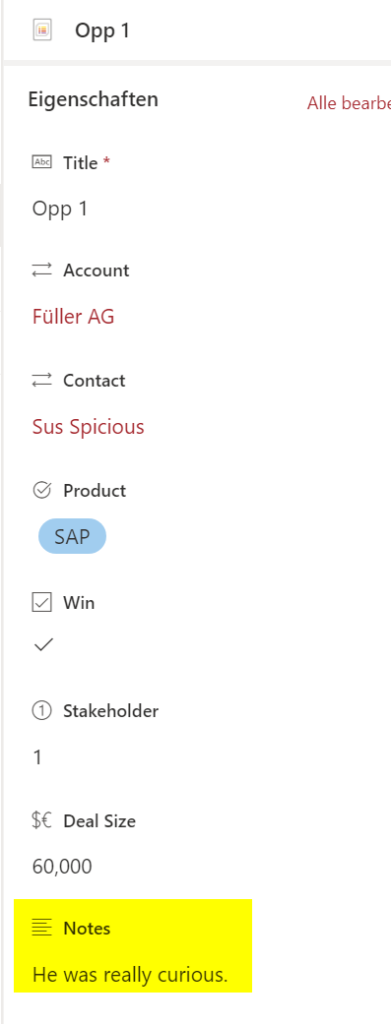
Get-PnPListItem -List "Opportunities" -Query "<Query><Where><Eq><FieldRef Name='Notes'/><Value Type='Note'>He was really curious.</Value></Eq></Where></Query>"

Example for text aka string
In this Query, I am looking for items, where the title equals Opp 3.
Get-PnPListItem -List "Opportunities" -Query "<Query><Where><Eq><FieldRef Name='Title'/><Value Type='Text'>Opp 3</Value></Eq></Where></Query>"

Example for user
In this query, I am looking for items, where the authors UPN is Serkar@devmodernworkplace.onmicrosoft.com.
Get-PnPListItem -List "Opportunities" -Query "<Query><Where><Eq><FieldRef Name='Author' /><Value Type='User'>Serkar@devmodernworkplace.onmicrosoft.com</Value></Eq></Where></Query>"

Example for OR
In this query, I am looking for items, where the value for Stakeholder is 1 or the value Win is yes.

Get-PnPListItem -List $ListName -Query "<View><Query><Where><Or><Eq><FieldRef Name='Stakeholder'/><Value Type='Integer'>1</Value></Eq><Eq><FieldRef Name='Win'/><Value Type='Boolean'>1</Value></Eq></Or></Where></Query></View>"

Example for AND
In this query, I am looking for items, where the value for Stakeholder is 1 and the value Win is yes.

Get-PnPListItem -List $ListName -Query "<View><Query><Where><And><Eq><FieldRef Name='Stakeholder'/><Value Type='Integer'>1</Value></Eq><Eq><FieldRef Name='Win'/><Value Type='Boolean'>1</Value></Eq></And></Where></Query></View>"

Complete example
$Url = "https://devmodernworkplace.sharepoint.com/sites/Sales"
$ListName = "Opportunities"

Connect-PnPOnline -Url $Url -Interactive

$AmountOfStakeholders = 2
$ColumName = "Stakeholder"

Get-PnPListItem -List $ListName -Query "<View><Query><Where><Eq><FieldRef Name='$ColumName'/><Value Type='Integer'>$AmountOfStakeholders</Value></Eq></Where></Query></View>"
Troubleshooting
I am getting to many items
Error
You get nearly every item in the list, but you are filtering for specific SharePoint items
Cause
Maybe you forgot the <View> part?
Resolution
Without view:

With view:

Get-PnPListItem -List "Opportunities" -Query "<View><Query><Where><Eq><FieldRef Name='Stakeholder'/><Value Type='Integer'>2</Value></Eq></Where></Query></View>"
Exception from HRESULT: 0x80131904
Error message:
Get-PnPListItem : Exception from HRESULT: 0x80131904
In Zeile:1 Zeichen:1
+ Get-PnPListItem -List "Opportunities" -Query "<View><Query><Where><gt ...
+ ~~~~~~~~~~~~~~~~~~~~~~~~~~~~~~~~~~~~~~~~~~~~~~~~~~~~~~~~~~~~~~~~~~~~~
    + CategoryInfo          : WriteError: (:) [Get-PnPListItem], ServerException
    + FullyQualifiedErrorId : EXCEPTION,PnP.PowerShell.Commands.Lists.GetListItem
Cause:
You did not care about the case sensitivity of the logical operands
Resolution:
Wrong:
Get-PnPListItem -List "Opportunities" -Query "<View><Query><Where><gt><FieldRef Name='Created'/><Value Type='DateTime' IncludeTimeValue='FALSE'>$CreationDate</Value></gt></Where></Query></View>"
Right:
Get-PnPListItem -List "Opportunities" -Query "<View><Query><Where><Gt><FieldRef Name='Created'/><Value Type='DateTime' IncludeTimeValue='FALSE'>$CreationDate</Value></Gt></Where></Query></View>"
Field types are not installed properly
Error message in german
Get-PnPListItem : Mindestens ein Feld ist nicht richtig installiert. Wechseln Sie zur Listeneinstellungsseite, um diese Felder zu löschen.
In Zeile:1 Zeichen:1
+ Get-PnPListItem -List "Opportunities" -Query "<View><Query><Where><Gt ...
+ ~~~~~~~~~~~~~~~~~~~~~~~~~~~~~~~~~~~~~~~~~~~~~~~~~~~~~~~~~~~~~~~~~~~~~
    + CategoryInfo          : WriteError: (:) [Get-PnPListItem], ServerException
    + FullyQualifiedErrorId : EXCEPTION,PnP.PowerShell.Commands.Lists.GetListItem
Error message in english
Get-PnPListItem : One or more field types are not installed properly. Go to the list settings page to delete these fields.
In Zeile:1 Zeichen:1
+ Get-PnPListItem -List "Opportunities" -Query "<View><Query><Where><Gt ...
+ ~~~~~~~~~~~~~~~~~~~~~~~~~~~~~~~~~~~~~~~~~~~~~~~~~~~~~~~~~~~~~~~~~~~~~
    + CategoryInfo          : WriteError: (:) [Get-PnPListItem], ServerException
    + FullyQualifiedErrorId : EXCEPTION,PnP.PowerShell.Commands.Lists.GetListItem
Cause
You did not care of the case sensitivity of the column name
Resolution
Wrong:
Get-PnPListItem -List "Opportunities" -Query "<View><Query><Where><Gt><FieldRef Name='created'/><Value Type='DateTime' IncludeTimeValue='FALSE'>$CreationDate</Value></Gt></Where></Query></View>"
Right:
Get-PnPListItem -List "Opportunities" -Query "<View><Query><Where><Gt><FieldRef Name='Created'/><Value Type='DateTime' IncludeTimeValue='FALSE'>$CreationDate</Value></Gt></Where></Query></View>"