
Hello together, in my latest activity as an consutlant I encountered following issue: I got a objects with two meta data. In my example it was a milestone with an link to the milestone activity. Since it were more than 30 items, I didn’t want to work with PSObjects. I was searching for a solution to create multi value arrays in PowerShell with little code as possible. If I would work with PSObjects, it would blow up my code. In this article, I will show you how you can create “normal” arrays and also how you can enhance this arrays, to multi value arrays in PowerShell.
Create Standard PowerShell Arrays in PowerShell
A standard array is set up like this:
$array = @("Value1","Value2")You can also write it like this:
$Array = @(
    "Value1"
    "Value2"
)
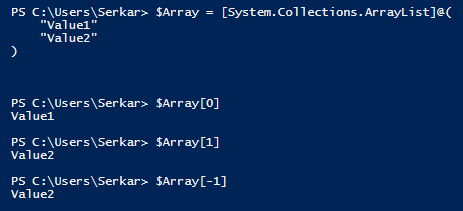
So you can get the single values, by putting in the index number of it in square brackets – like $Array[0] for the first value and $Array[1] for the second value. With [-1] you can get the last value of the array.
Add Value to Standard PowerShell Arrays
You can add new lines in the array like this:
$Array.Add("Value3")Remove Value from Standard PowerShell Arrays
You can remove the lines of an array like this:
$Array.Remove("Value2")
Create multi value arrays in PowerShell
| Displayname | Link |
| Microsoft | https://microsoft.com |
| SPOScripts | https://workplace-automation.com/ |
| Azure Portal | https://portal.azure.com |
| ZMYLER | https://zmyler.com |
For creating a multi value arrays in PowerShell, we have to inject a hashtable to each array line.
A hashtable looks like this:
@{KEY="VALUE"; KEY2 = "VALUE2"; KEYn = "VALUEn"}So your multi value arrays will look like this:
$Array = @(
    @{ Key1=("Value1"); Key2=("Value2")}
    @{ Key1=("Value3") ;Key2=("Value4")}
)
For my example it looks like this:
$Array = @(
    @{ Displayname=("Microsoft"); Link=("https://microsoft.com")}
    @{ Displayname=("Google"); Link=("https://google.com")}
    @{ Displayname=("Azure Portal"); Link=("https://portal.azure.com")}
    @{ Displayname=("ZMYLER"); Link=("https://zmyler.com")}
)
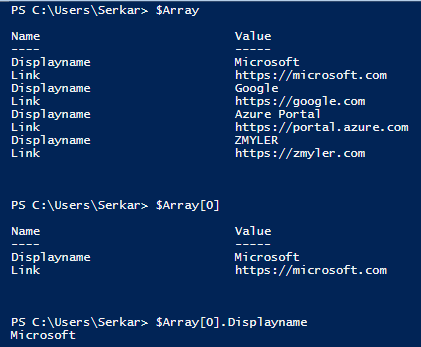
As you can see, you can also get the single values of each line in array:
Add Value to mutli value Arrays in PowerShell
You can add a value to a multi value array in PowerShell like this:
$Array.Add( @{ Displayname=("Ad-equum"); Link=("https://www.ad-equum.de/")} )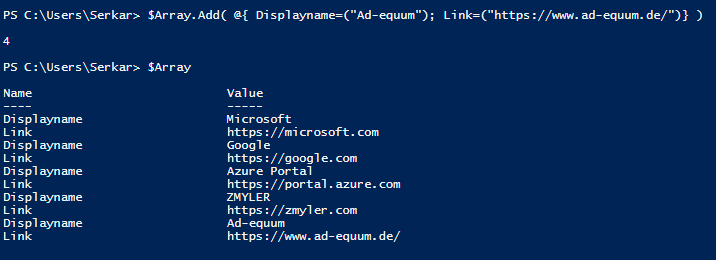
Remove Value from multi value arrays in PowerShell
Removing a value from a multi value arrays in PowerShell is more complicated. You have to redefine the array, by filtering out the value, which you don’t want in your array:
$Array = $Array | Where-Object {$_.displayname -ne "Ad-equum"}Conclusio
If you want to create a multi value arrays in PowerShell, the only thing you have to do is to inject a hashtable to each line. I hope, that I have saved you a ton of work 🙂
Further Reading
Here is the official reference of Microsoft to arrays: Everything you wanted to know about arrays – PowerShell | Microsoft Docs
If you are interested in hasthables, check Microsofts docs: Everything you wanted to know about hashtables – PowerShell | Microsoft Docs
Leave a Reply